

A calmer way to share gift ideas
A birthday wish list guests can actually use
Gather ideas and useful links in one shareable list, so guests can find a gift that feels right without asking the same questions in several chats.
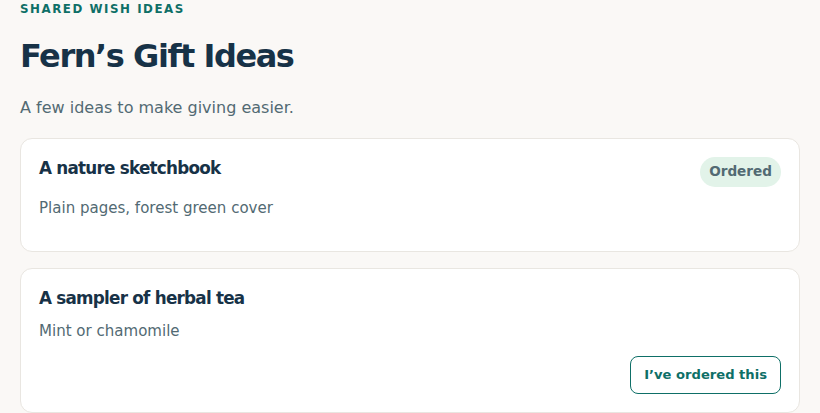
Add a mix of specific items and broad interests, then share the list with the people invited. The list owner can pause external sharing whenever they want. When a guest marks an item ordered, that status is hidden from the list owner to help preserve a surprise; guests can coordinate purchases without claiming the list is a checkout or inventory system.
Useful for birthdays at every age
Include sizes, favorite colors, hobbies, or a few flexible ideas. Guests can see current ordered status to reduce duplicate purchases, while the recipient does not see that coordination. Keep personal details off a list shared beyond your household.
Build a useful list in a few steps
- Pick a clear title, such as “Maya’s 8th birthday ideas.”
- Add a range of ideas: art supplies, a favorite book series, an experience, or a broad interest like dinosaurs.
- Include short details guests need, such as size or preferred edition, and add links only when helpful.
- Share the list with invited guests and pause external sharing after the celebration.
For example, instead of listing only one exact toy, include “beginner watercolor set,” “animals and nature books,” and “crafts for rainy days.” That gives guests options at different prices.
Choose who can see the list
Sharing is controlled for each list and can be paused by its owner. A public sharing link is for viewing gift ideas; it does not create a guest account or make the recipient’s private draw data public.
Frequently asked questions
Can guests see whether something is already ordered?
Yes. Guest-facing ordered status helps coordinate purchases; it is hidden from the list owner to keep the surprise.
Can the owner stop sharing?
Yes. External sharing can be paused for the list.
Does the list take payment?
No. It shares ideas and coordination status; purchases happen with the retailer or seller.
Start a birthday list
Manage your shared wish lists through My Stuff.
Planning a child’s birthday? See the kids’ birthday gift registry guide, including parent-managed lists and QR sharing.